
LIFELENZ
Positive Circularity Pty LtdBusiness
4.4151.00 Reviews
- Version
- 1.76.40
- Installs
- 100.00K
- Age Rating
- Everyone
Screenshots
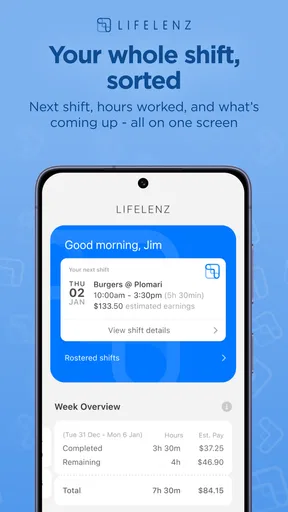
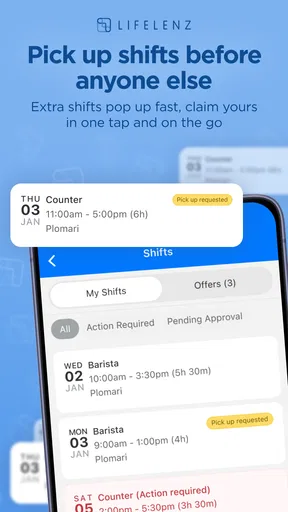
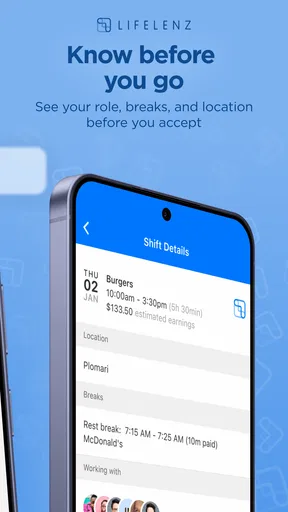
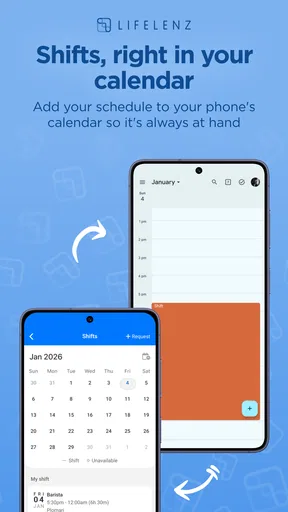
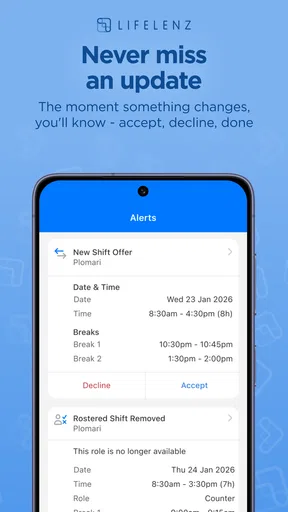
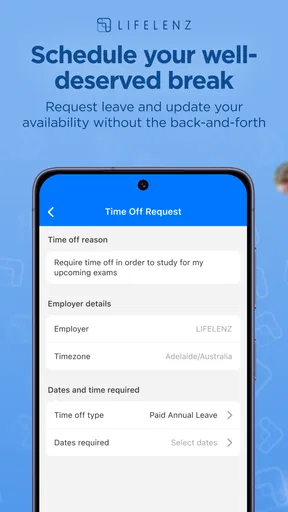
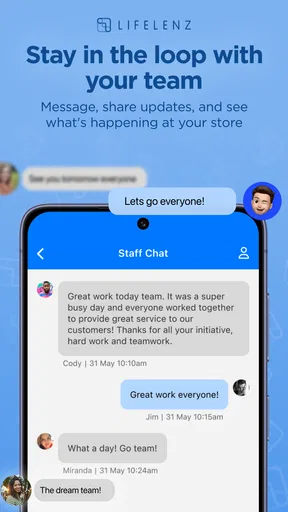
Our Review of LIFELENZ
 Analysis by Appyee
I approached LIFELENZ as a practical workforce-management app rather than as a general productivity tool. That distinction matters: its value depends less on personal to-do lists and more on how easily people can understand and complete work-related tasks in the context of a team. In my experience, the most important question is not whether it looks impressive at first launch, but whether different employees can use it with a similar level of confidence.
The app comes from Positive Circularity Pty Ltd and is available free of charge for Android users. It is rated for Everyone, which makes it broadly approachable in terms of intended audience, although an age label alone cannot tell you whether every screen, workflow, or workplace situation will feel equally accessible. The current version is 1.76.40, and it works on Android 6.0 or later. Its public reach is also meaningful: it has passed the 100K+ install mark, with a 4.4 average from around 865 ratings and roughly 151 written reviews.
That level of adoption suggests that LIFELENZ is being used for more than occasional experimentation. Still, I would not choose it simply because it is free or familiar to other teams. I would choose it when an organization needs a mobile point of contact for workforce activity and is prepared to make its internal processes clear. The app can help bring work information closer to employees, but it cannot fix confusing instructions, poor scheduling habits, or inaccessible workplace communication on its own.
How clearly the app presents work information
I find that work information is only useful when people can act on it without stopping to decode the interface. This section looks at how clear labels, concise instructions, and role-based guidance can make LIFELENZ easier to use during a busy shift. I’ll also consider how a team can tell whether a screen is genuinely understandable, rather than merely easy to open.
Readability and navigation in everyday use
When I assess a workforce app, I start with the first few minutes: can I tell where I am, what I am expected to do, and what action matters next? LIFELENZ is best understood as a work-facing tool, so its navigation has to serve people who may be checking it quickly between duties rather than sitting at a desk with time to explore. That makes clear labels and predictable movement between areas more important than decorative design.
For an employee, the ideal experience is a short path from opening the app to finding the relevant work information. A supervisor may approach the same product differently, looking for a broader view of team activity. These are not identical needs. Someone who only checks assigned information should not have to interpret a large management-oriented interface, while a manager needs enough context to avoid making decisions from isolated details.
My practical advice is to spend time identifying the few screens that matter most for each role. Do not train every person on every possible area if their job only requires a small portion of the app. A short role-based guide, using the exact names shown in the interface, will usually be more useful than a long document full of general explanations. This is one of the less obvious ways to make LIFELENZ feel more accessible: reduce the amount of navigation each person must remember.
Readability also depends on the information supplied by the organization. Short instructions are easier to scan than paragraphs written in internal jargon. If a task needs a special condition, that condition should be stated in plain language rather than hidden behind an abbreviation. The app can present work information, but managers still control whether that information is understandable.
I would be cautious about assuming that a clean-looking screen automatically works for everyone. People with dyslexia, reduced vision, attention differences, or limited familiarity with workplace software may need more time to interpret dense content. The most useful test is to watch a real employee complete a normal task without coaching. If they repeatedly pause, zoom, backtrack, or ask what a label means, the problem is not solved by saying the app is simple.
What different users need from the same interface
LIFELENZ has a natural advantage over paper notices and scattered messages because it can give a workforce one mobile place to consult. That can reduce the burden on employees who find it difficult to remember verbal instructions or search through several communication channels. It is especially helpful when a person needs to check information privately instead of asking a colleague to repeat it.
At the same time, a single digital channel can create a new problem if every employee is expected to interpret it in exactly the same way. New starters, people working in a second language, and staff who are less confident with smartphones may require a slower introduction. I would pair the app with a short demonstration and a simple fallback explanation of what to do if a screen is unclear.
A useful workflow is to ask employees to show how they would find one ordinary piece of work information, then how they would confirm that they had understood it. That second step is important. Finding a screen is not the same as understanding its meaning. For teams with mixed literacy or language needs, visual examples and consistent wording can make the difference between nominal access and practical access.
Managers should also avoid treating mobile availability as proof that everyone can participate equally. Some workers may share devices, have limited data, or be unable to look at a phone during active duties. LIFELENZ may still be part of the solution, but the organization needs a fair process for people who cannot consult it at the same moment as everyone else.
Using LIFELENZ across abilities and situations
I also think a workforce app has to work beyond the ideal case of someone seated with a recent phone and plenty of time. Here I’ll consider how different abilities, devices, and job settings affect everyday use, and what a thoughtful rollout can do to reduce friction. That wider view helps clarify when LIFELENZ is a useful channel and when another method should remain available.
Motor and sensory considerations
Mobile workforce software is often used with one hand, while standing, or while moving between locations. That creates motor demands that are easy to overlook. Small touch targets, repeated scrolling, and forms that require precise taps can be tiring for people with tremors, limited dexterity, joint pain, or temporary injuries. I would test the most common workflow with both hands and at a deliberately slower pace before making it part of a mandatory routine.
The physical setting matters just as much. A worker may be wearing gloves, carrying equipment, dealing with glare, or using the phone in a noisy area. A process that feels effortless at a desk may become frustrating in a warehouse, vehicle, shop floor, or outdoor location. Even without claiming specialized accessibility support, a responsible rollout should identify where employees are expected to use the app and whether that environment permits safe, accurate interaction.
Sensory differences deserve the same attention. Some people may rely on enlarged text, stronger contrast, screen readers, or reduced visual stimulation at the operating-system level. Others may struggle with sound-based prompts in noisy workplaces or with instructions that depend heavily on color. I would not promise that every need is covered simply because Android offers accessibility settings. Instead, I would check the actual LIFELENZ workflows on the devices employees use and confirm that essential information remains understandable when those settings are enabled.
One concrete tip is to separate urgent work instructions from optional explanatory material. When the essential action is buried among several visual elements, users with attention or processing difficulties have more work to do. A concise instruction followed by supporting detail is easier to handle than a single crowded block. This is also better for anyone checking the app under time pressure.
Another useful test is to ask a person who did not help design the workflow to complete it without spoken hints. Designers and managers often unconsciously fill in missing context because they already know the process. A first-time user exposes the real friction: unclear buttons, unexpected screen changes, or a final confirmation that is easy to miss.
Situational access for a working day
The strongest case for LIFELENZ is a workplace where employees need mobile access to organized workforce information and where managers want a more consistent channel than noticeboards, phone calls, or informal chat. Compared with paper, the app is easier to update centrally and more convenient for someone who is rarely near a staff room. Compared with a general messaging service, it can provide a work-specific environment rather than mixing instructions with unrelated conversations.
That does not make it a universal replacement. A messaging app may be better for a quick two-way conversation, while a calendar or scheduling product may be stronger when the main requirement is visual planning. A paper backup may remain the safer option during device problems, battery loss, poor connectivity, or situations where phones are not permitted. The right comparison is not “which tool is best?” but “which part of the work process does each tool handle reliably?”
Consider a realistic example. A retail employee starts a shift, needs to check the latest work information, and has only a short period before serving customers. LIFELENZ can be useful if the relevant content is easy to locate and written in direct language. The employee can consult it without waiting for a supervisor to repeat the message. But if the store is noisy, the phone is locked away during service, or the instruction requires a long form while the employee is busy, the same workflow becomes less practical. A manager should plan for those conditions rather than blaming the employee for not checking.
For shift-based teams, I would establish a clear rule about when information is considered received. An app notification or posted update should not automatically be treated as proof that every worker has understood it. For important changes, the organization should provide an appropriate confirmation method and a human contact for clarification. This is a particularly important inclusion measure for employees who cannot process mobile information quickly or who need an alternative explanation.
Remote and hybrid workers may experience the app differently from on-site staff. Someone working alone may appreciate having a central work channel, while another person may find repeated mobile checks intrusive if they already use several systems. The organization should define which information belongs in LIFELENZ and which belongs elsewhere. Clear boundaries reduce cognitive load and prevent employees from hunting across multiple tools.
Remaining barriers before a wider rollout
The main limitation I see is that accessibility is not only a property of the application. It is also shaped by device choice, workplace rules, language, training, and the quality of the content entered by managers. A free app can still impose costs if employees need newer phones, reliable connectivity, personal data, or unpaid time to learn it. Those practical burdens should be discussed before deployment.
Device variation can create uneven experiences. Android 6.0 compatibility gives the app a broad technical starting point, but older phones may differ in screen size, performance, battery health, and support for system accessibility features. I would pilot the app on the oldest commonly used device in the workforce, not only on a recent phone. If the workflow is difficult there, that is a workplace planning issue, not merely an individual inconvenience.
Privacy and personal boundaries also deserve attention. Employees may not want work activity mixed with their private phone use, and some may have legitimate reasons for limiting notifications. Managers should explain what the app is used for, when employees are expected to check it, and what alternative exists for people who cannot use a personal device. I would be wary of any rollout that assumes constant availability outside working hours.
There is also a human barrier: some employees may hesitate to admit that they cannot read, hear, or operate a workflow comfortably. A private trial is more revealing than a public show of hands. Give people a way to report difficulty without making it sound like a lack of competence. Then adjust the process, simplify the wording, or provide another route where needed.
For organizations comparing LIFELENZ with a broader workforce suite, the trade-off is focus versus breadth. A larger platform may offer more extensive integrations, reporting, or scheduling controls, but it can also be harder to learn and more expensive to manage. LIFELENZ is more appealing when the priority is a mobile workforce connection rather than building an entire enterprise system around one product. If the business needs complex payroll, advanced rostering, or deep document collaboration, I would investigate dedicated tools alongside it rather than expecting one app to cover every function.
Who will benefit, and who should look elsewhere
I would recommend trying LIFELENZ for organizations with distributed employees, mobile teams, or a need to make workforce information easier to reach away from a computer. It is also worth considering for managers who want to reduce dependence on verbal relay, provided they are willing to write clear content and support employees during the changeover.
I would be more cautious for a very small team that already communicates effectively face to face and has no recurring need for a workforce app. Adding another channel can create unnecessary administration. I would also look elsewhere, or use LIFELENZ only as one part of a larger setup, if the central requirement is detailed scheduling, payroll, formal case management, or intensive real-time collaboration.
Before committing, I suggest running a small trial with people who have different levels of digital confidence and different working conditions. Ask them to complete the most important task using their usual device, in the place where they normally work. Measure success by whether they can complete it independently and understand the result, not merely by whether they can open the app.
That trial should include a person who uses larger text or other phone-level adjustments, someone who works in a noisy or bright environment, and someone who is new to the organization. These perspectives reveal barriers that a management demonstration will miss. They also help distinguish a problem with LIFELENZ from a problem with the workflow design around it.
My inclusive verdict on this workforce app
After looking at LIFELENZ through the lens of readability, motor demands, sensory conditions, and real workplace situations, I see a useful but context-dependent tool. Its free availability and broad Android compatibility make it easy to consider, while its workforce focus gives it a clearer purpose than a general notes or messaging app. The strongest benefit is the possibility of giving employees a consistent mobile route to work information.
Its inclusive value depends heavily on implementation. The app should be introduced with role-specific guidance, plain language, realistic device testing, and a genuine alternative for people who cannot use a phone at a particular time. Managers should check understanding instead of assuming that a posted update has reached everyone equally. They should also avoid turning mobile access into an expectation of permanent availability.
I especially like the idea of using LIFELENZ as one dependable layer in a wider communication process, rather than forcing it to replace every other method. Keep a human contact for questions, retain a suitable backup for urgent or inaccessible situations, and make the most important information easy to find. Those choices will do more for inclusion than simply installing the app across a team.
My final recommendation is therefore measured: LIFELENZ is worth testing if your organization needs a mobile workforce-management option and is prepared to design the surrounding process carefully. It is a sensible choice for teams that value centralized access without immediately taking on a larger, more complicated platform. I would not recommend adopting it blindly for every employee or every task. Used thoughtfully, it can remove some communication friction; used as a substitute for clear management and accessible alternatives, it may simply move that friction onto a phone.
For a free Business app developed by Positive Circularity Pty Ltd, its established user base and strong average rating make it a credible candidate for a workplace pilot. The important next step is personal: test the exact tasks your employees perform, on the devices and in the environments they actually use. If people with different abilities can find, understand, and complete those tasks without unnecessary help, LIFELENZ has a meaningful place in your workflow.
Verdict
Strengths of LIFELENZ
- Real-time location sharing helps trusted contacts know where you are.
- Emergency alerts can provide added reassurance during risky situations.
- Useful for families coordinating safety and daily movements.
- Designed to support quick communication during urgent events.
- May help users monitor loved ones without constant phone calls.
Limitations of LIFELENZ
- Some features may require an ongoing subscription or paid plan.
- Continuous location tracking can affect battery life and mobile data usage.
- Privacy depends on trusting the service and selected emergency contacts.
- Location accuracy may vary indoors or in areas with weak signal.
- The app may feel unnecessary for users who rarely need safety monitoring.
Similar Picks in This Category
View All
LinkedIn: Community & Network
LinkedIn3.8

Zoom Workplace
zoom.com4.1

Microsoft Teams
Microsoft Corporation4.6

Meta Business Suite
Meta Platforms, Inc.4.6

Webex Meetings
Cisco Systems, Inc.4.5

TeamViewer Remote Control
TeamViewer4.4
Frequently Asked Questions
What is LIFELENZ and what can I use it for?
LIFELENZ is a mobile health and wellness platform designed to help users monitor, organize, and better understand personal health information. Depending on the available features and your connected devices or services, it may provide access to health records, wellness data, care-related information, reminders, or communication tools. Before downloading, check whether its features are supported in your country and by your healthcare provider.
Is LIFELENZ free to download and use?
The LIFELENZ app may be free to download, but some services can depend on your healthcare organization, employer, insurance provider, subscription plan, or connected health device. Availability and pricing may therefore differ between users. It is worth reviewing the app-store listing and any terms shown during registration so you understand whether additional fees, account requirements, or premium services apply.
Is LIFELENZ safe for storing personal health information?
Because LIFELENZ can involve sensitive medical or wellness information, privacy and security should be considered before creating an account. Review the app’s privacy policy to learn what data is collected, how it is used, where it may be stored, and whether it is shared with healthcare providers or service partners. Use a strong password and avoid accessing your account on unsecured public networks.
Can LIFELENZ connect with my doctor, healthcare provider, or wearable device?
LIFELENZ may support connections with participating healthcare providers, organizations, or compatible health services, but the exact integrations depend on your location and account eligibility. Some devices may also require separate setup, permissions, or manufacturer applications. Before downloading, confirm that your provider and device are supported, since installing the app alone may not unlock every feature shown in promotional materials.
Does LIFELENZ replace professional medical advice or emergency care?
No. LIFELENZ should be treated as a tool for accessing, organizing, or tracking health-related information rather than as a replacement for a qualified medical professional. Information displayed in the app may be delayed, incomplete, or dependent on connected services. Do not use it to diagnose a serious condition or make urgent treatment decisions. Contact a healthcare professional or emergency services when immediate help is needed.
